
Metadata export
Export TikTok Video Data to Excel
Take the selected videos from a creator, short drama, or list workflow and export their public metadata to an XLSX workbook. Open it in Excel, Google Sheets, or another spreadsheet tool.
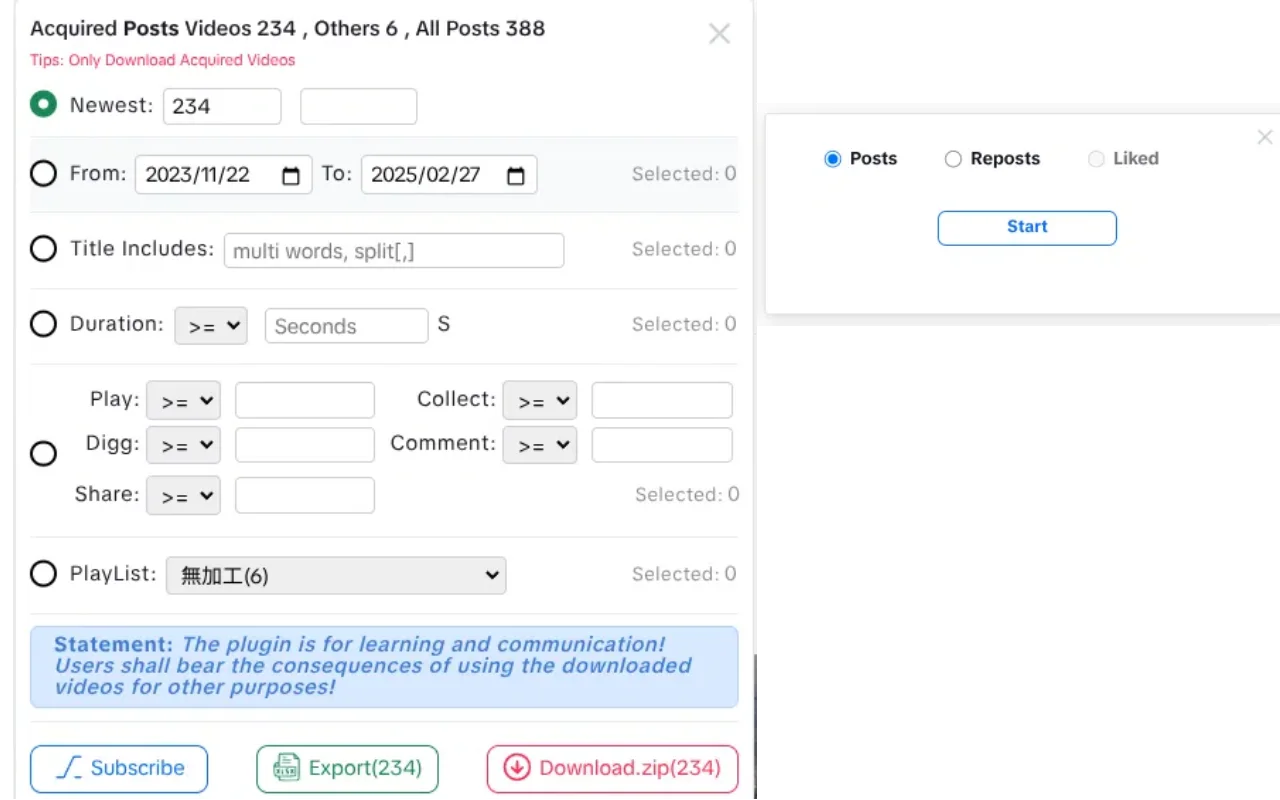
Selection is the source
The workbook uses the selected videos from the current workflow. It does not silently include other records.
Local file output
BVT generates the workbook in your browser and saves it locally. There is no upload step or spreadsheet integration.
Missing values stay missing
If a field is not exposed by the page, it is left blank rather than estimated or filled with a default.
Field reference
Fifteen columns, one row per selected video.
These are the fields BVT writes when the page exposes a value for the record.
| Column | What it contains |
|---|---|
| Video ID | The numeric TikTok video identifier. |
| Video Cover | Cover image URL exposed by the page. |
| Video Desc | The video description or caption. |
| Video Detail | A link to the public video detail page. |
| Video Url | The media URL used by the download workflow. |
| isTop | Whether the page marks the item as pinned, where available. |
| Create Date | The publish date exposed by the page. |
| PlayList ID | Playlist identifier when the video belongs to a playlist. |
| PlayList Name | Playlist name when available. |
| Duration | Video duration from the page data. |
| Play Count | Public play count where available. |
| Digg Count | Public like count where available. |
| Collect Count | Public save/collect count where available. |
| Comment Count | Public comment count where available. |
| Share Count | Public share count where available. |
Workflow
Select, export, and document the sample.
A spreadsheet is easier to trust when the source page and filter context travel with it.
- 1
Build the selection
Load the creator, drama, or list page and select the videos you need. Confirm the count.
- 2
Start the export
Use the BVT export action. The extension writes the selected records to an XLSX workbook.
- 3
Open the file
Open the workbook in Excel, Google Sheets, or another spreadsheet application.
- 4
Check the rows
Confirm the row count and spot-check a few known videos before sharing or cleaning the file.
- 5
Keep the context
Record the source URL, capture date, filters, and known missing fields next to the file.
Data hygiene
Keep the sample explainable.
A workbook without its source context looks more precise than it is.
- Store the source page URL and capture date with the file.
- Note the filters and selection method used.
- Do not treat a blank cell as zero; it usually means the field was missing.
- Keep the raw export separate from a cleaned version.
What the workbook is not
It is not a sales report, a complete account history, or a live dashboard. It is a local snapshot of the public fields attached to the videos you selected.
Limits
What the export cannot tell you.
The export contains selected records from the loaded page sample. It is not a platform-wide dataset.
Fields are included only when the page exposes them. Missing values are left blank.
Counts are a snapshot, not a live feed or a historical trend.
The workbook does not include sales, revenue, ad spend, conversion, or audience demographics.
BVT does not merge records across pages, tabs, or browsing sessions.
FAQ
XLSX export questions.
Which fields are included in the XLSX export?
Video ID, cover URL, description, detail URL, media URL, isTop, create date, playlist ID, playlist name, duration, play count, digg count, collect count, comment count, and share count.
Which videos are included?
The export uses the selected videos from the current creator, short drama, or list workflow. It does not merge data across pages, tabs, or browsing sessions.
Are the engagement counts live?
They are a snapshot of the values the page exposes at the time of the run. BVT does not refresh them in the background or provide historical trends.
Does the export include sales or revenue?
No. BVT does not estimate sales, revenue, advertising spend, or conversion. The workbook contains the public metadata fields listed above, where available.
Is the XLSX file an Excel integration?
No. BVT generates a local .xlsx workbook that you can open in Excel, Google Sheets, or another spreadsheet application. There is no account connection, add-in, or automatic sync.
BVT
Keep the metadata with the videos.
Install BVT, select the records you need, and export a local XLSX workbook. Pro unlocks the full batch workflow.